Slock Is Now Raft: Installation, Agent Setup, and Common Problems
2026 update: Slock has been renamed to Raft. This article keeps the real-world experience from the Slock phase and adds the current rename, compatibility, and migration context. Raft is still evolving quickly, so installation commands and UI details should always be checked against the current product page.
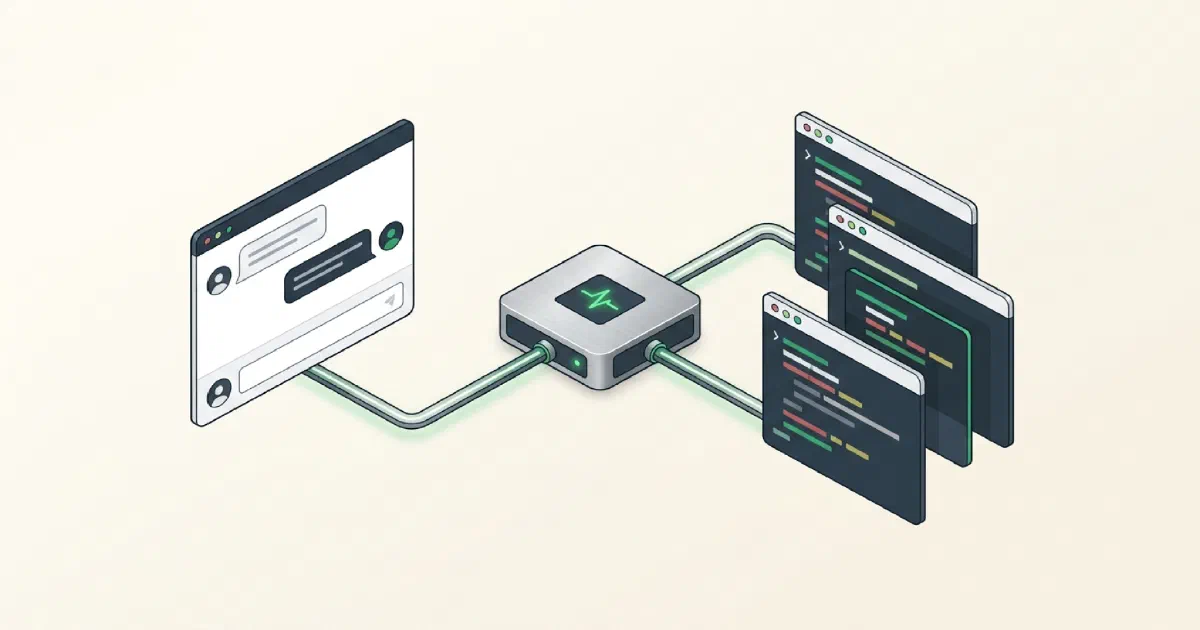
Slock, now renamed to Raft, is a chat-based way to dispatch local agents. You connect command-line tools such as Claude Code, Codex CLI, Gemini CLI, OpenCode, and OpenCLI , then @ them in channels to assign work, review plans, and collect results.
When several AIs are working on different tasks at the same time, Raft gives you a remote command surface: who does what, where results come back, and how you notice when an agent has gone off course.
The product has been moving from the Slock package family toward Raft. The newer CLI package is now under @botiverse/*, while the legacy @slock-ai/* packages still exist as compatibility shims. The old slock aliases remain relevant in older environments.
This article was originally compiled from real usage across a Slock community of several hundred people. Community behavior changes with versions, so the sections below should be read as operating patterns and field notes rather than permanent product documentation.
Raft feels like a dispatch channel for agents
If you only use one coding agent, opening Claude Code or Codex directly is usually simpler.
Raft becomes useful when:
- several agents are running at the same time and you want one chat surface for dispatch;
- you want to assign work from a phone while your own computer performs the actual task;
- different agents need to see some shared channel context;
- code, webpages, reports, and non-coding tasks are mixed together and different tools need to be called as needed.
The advantage is immediacy. Assigning work feels like calling people into a group chat.
The cost is equally clear: several agents sharing a channel can consume more tokens, and if permissions and pacing are loose, agents can move too quickly and create expensive rework.
The daemon was the relay layer
In the Slock architecture, the daemon acted as the message-routing layer.
A message sent from the web or app reached the daemon running on your computer. The daemon forwarded it to the selected CLI tool. When the CLI finished, its result came back through the daemon into the chat interface.
That led to three practical consequences:
- What an agent can do depends on which CLIs are installed on the local machine.
- Code and files remain on your own computer; the cloud side primarily handles message relay and state synchronization.
- Each agent is its own process with its own session and context, so work can continue after the browser is closed.
From Slock daemon to Raft Computer
As the product moved from Slock to Raft, both the machine-connection flow and the official npm package names changed.
Machine connection
- Slock phase: the normal path was installing and starting the old
@slock-ai/daemon. - Transition phase:
@botiverse/raft-daemonappeared as the renamed replacement. - Current Raft direction: new hosted-agent machine connections are moving toward Raft Computer. The web console’s Add Computer page provides the setup command for the current operating system.
- Practical recommendation: for a new installation, follow the current Add Computer command. Older daemon-based setups still have compatibility and migration paths and do not need to be rebuilt immediately.
- Slock phase: the normal path was installing and starting the old
CLI package and aliases
- The older
@slock-ai/clipackage has moved to@botiverse/raftfor the current agent-facing CLI path. - Legacy aliases are still present. The old
slockcommand is a legacy alias for the CLI client, whileslock-daemonrefers to the old daemon service. They are not the same thing.
- The older
Raft currently offers Free and Pro plans, while Enterprise was not yet generally available when this article was last checked. Pricing and quotas can change, so those details should be verified on the current product page instead of treated as fixed here.
Start by getting one agent to answer reliably
Do not begin by building an “AI company.” First confirm that one agent works consistently.
- Connect a machine. An old Slock daemon environment can continue through the compatibility layer. For a new setup, use the current command from Raft’s Add Computer page and confirm the machine shows as online.
- Create the first agent. Choose a runtime such as Claude, Codex, or Gemini, name the agent, select the computer where it runs, choose the model, and wait for the online indicator.
- Send one simple instruction. Mention the agent in a channel and ask it to list the files in the current directory.
- Read the Activity logs. If nothing happens, common causes are a missing CLI, a PATH problem, exhausted model quota, or an API-key issue.
That is enough for the first checkpoint. Once one agent is stable, add a second and third.
Multi-model setups
In real use, I rarely want every task to run on the same model.
Complex reasoning can go to an expensive model. Repetitive work can go to a cheaper model. Lightweight queries can use another provider. That can reduce cost significantly.
In the Slock phase, a common setup was to give each agent its own environment variables such as ANTHROPIC_BASE_URL and ANTHROPIC_API_KEY. Agent configurations were isolated from one another.
One practical issue appeared with the Claude Code runtime: the Slock launch command could pass a fixed --model argument and override the model selected through environment variables.
Community workarounds included:
- switching Claude Code profiles with
cc switch; - using a runtime such as Kimi CLI that made multi-model configuration easier;
- patching the daemon so the launch command read the intended environment variable.
If you are just getting started, do not optimize the entire multi-model stack on day one. Get one primary agent stable first, then separate models gradually.
Do not put too many agents in one channel
Once you have more than two agents, channel design becomes a major variable.
Too few channels make unrelated work collide. Too many channels make the human coordination overhead worse.
Separate supervision from execution
A common pattern is to create a supervisor agent using a stronger model. It interprets the request, breaks the work into pieces, and dispatches those pieces to execution agents.
You mostly talk to the supervisor and reviewer rather than managing each worker directly.
The advantage is that you do not have to remember which agent is best at every task. You can say, “I need a report page that exports to PDF,” and let the supervisor decide who handles the API, who handles the frontend, and who reviews the result.
Review high-risk work before execution
Do not let an agent immediately perform high-risk changes.
A useful instruction is:
Give me the solution first. Do not modify files.
After reviewing it:
Approved. Start the change. Before editing, explain the affected scope and rollback path.
This feels slower, but it prevents an agent from changing a large set of files before you have agreed on the direction.
Keep monitoring separate
When five or six agents run at once, manually checking each one becomes tiring.
A cheap monitoring agent can periodically inspect which workers are stuck, throwing errors, or out of quota, then notify you or restart them when appropriate.
Some community users even ran a separate Slock Server for monitoring so the monitor’s context was isolated from the workers. That separation is cleaner than putting everything in one channel.
If agents move too fast, make them stop
Agents moving too fast is a real operational problem.
A request such as “implement this feature” can turn into twenty changed files in ten minutes. By the time you realize the direction is wrong, the work is already expensive to untangle.
I use explicit checkpoints:
- stop after the plan;
- stop after one module;
- stop after tests;
- stop before payments, deletion, posting, or deployment.
The efficiency of multiple agents comes from parallelism, not from removing the brakes.
Token cost comes from rereading shared channel context
Raft can be expensive in tokens even when nothing is technically wrong.
A channel behaves like a team room. When an agent reads a task, it may also read other agents’ messages from that same channel. If five agents share one channel, the same background can be consumed repeatedly.
Practical ways to reduce this:
- split channels by project or task;
- do not place unrelated agents together;
- use cheaper models for frequent low-value monitoring work;
- split large work into smaller tasks instead of sending several agents into the same large context;
- close out temporary tasks instead of treating the entire chat history as permanent memory;
- do not over-isolate everything either—the human management overhead also matters.
Raft is not a token-saving tool. It saves the attention required to coordinate several agents.
Non-coding use cases
Raft is not limited to writing code.
People in the community used Slock to search flights and hotels, plan trips, generate HTML reports, organize web content, and prepare workflows around voice input.
The important boundary is not what Raft itself can do. It is what the local CLI and toolchain can do.
If Claude Code can browse, call an API, or manipulate files locally, putting it behind Raft makes those capabilities remotely dispatchable.
For example, from a phone:
Find the cheapest Shanghai-to-Beijing flight tomorrow and turn the results into an HTML report.
The agent can run the research and generate a file on the computer, then return the result to the channel.
I would still keep payment and other irreversible actions manual. An agent can prepare the final step, but payment, ordering, deletion, and irreversible form submission should stop for human confirmation.
Raft Computer, PATH, and mobile use
New environments now connect machines through Raft Computer. Older Slock or transitional Raft environments may still use a legacy daemon and can continue to do so while migrating.
PATH was a common issue in older daemon-based setups.
One community case involved Slock failing to detect Gemini CLI even though the command worked in an interactive shell. The daemon process was starting with a PATH that did not contain the CLI’s directory.
If a CLI is missing only inside the old daemon environment, inspect the daemon’s actual runtime environment instead of only checking your shell.
On mobile, Raft Web can be added to the home screen. I find the mobile interface best for dispatching work, checking results, and following agent status rather than performing complex editing.
Slock-era community clients also existed, but those third-party routes changed quickly and are no longer the recommended path in this article.
When an agent stalls, check Activity first
If an agent suddenly stops responding, I check three things first:
- The daemon or queue is stuck. Open Activity and inspect the logs. Restart the agent or daemon if needed.
- The API quota is exhausted or rate-limited. If Activity shows a 429, switch the model or account, or wait for the reset.
- The task finished but no message returned. That can be a state-synchronization issue; restarting the agent often restores the flow.
Other issues that came up in older environments:
- Claude Code connected to another model but ignored the selection: a model launch argument may be overriding the configuration; community workarounds included Kimi CLI,
cc switch, or patching the daemon. - Mobile web enters a channel and cannot return home: in that older UI, changing the end of the URL to
/homeworked around it. - A task remains stuck after deleting an agent: have the agent finish or release the task before deleting it.
- Workspace images appear as binary or 0B: download them locally before assuming the file is unusable.
- OpenCode fails to recognize a provider: inspect which configuration file the daemon is actually detecting.
These are field notes from specific versions, not promises about the current UI.
Raft and Multica solve different coordination problems
Raft feels like a chatroom: immediate, lightweight, and good for calling agents into work on demand. In one channel, one agent can research while another changes code and a third reads logs.
Multica feels more like an office: requirements become issues with owners, deliverables, statuses, and acceptance criteria. Once your work shifts from “do this quick thing” to “several tasks are progressing at once,” that structure becomes much more useful.
The tools are not necessarily substitutes.
A practical split can be:
- Raft for the conversation layer and fast dispatch;
- Multica for the project/task layer;
- OpenCLI for workflows that have no API but can still be operated through a web interface.
Whether Raft is worth using depends on whether you genuinely need to coordinate several agents.
If you have one AI, do not make the toolchain more complicated than the work.
If you already have three to five agents running in parallel, the reduction in coordination overhead can be substantial.
Comments