Choosing a Low-Cost US Phone Number: Saily Web Checkout Guide, Review, and a $4 Mistake
Contents
I recently needed a low-cost +1 US phone number that I could keep long term for receiving SMS verification codes.
Disposable SMS sites were out immediately. Once you register an account, future logins keep sending SMS OTPs, so the number has to stay under my own control. Before buying anything, I had AI walk through the usual low-cost US phone number and prepaid SIM options.
Why I Skipped Talkatone, Google Voice, PayGo, and Tello
First up was Talkatone. Plenty of people use it, but after checking with AI I ruled it out quickly: free numbers can be reclaimed after 30 days of inactivity, and receiving short-code verification SMS requires Talkatone Plus at $4.99 a month. Two months of that already costs close to a full year elsewhere, and the provider explicitly labels it a VoIP line. The value just wasn’t there.
Next was Google Voice. I don’t have an existing GV number, which meant buying a pre-made account. Typical reseller tiers run around RMB 42 for an aged Gmail with a fresh GV number, or RMB 69 for an aged Gmail with an aged GV number. Cheap enough, sure, but buying a secondhand account leaves a nagging worry: if the seller ever recovers it or Google suspends it, every account tied to that number loses login OTPs overnight.
Looking at physical US SIMs, the most searched option is Ultra Mobile PayGo. It runs natively on T-Mobile as a true non-VoIP carrier line, which gives it the highest acceptance rate with strict US banks. The monthly plan is $3 (including 100 minutes and 100 texts), so keeping it alive costs $36 a year.
What put me off was the acquisition and maintenance friction. Official sales happen mostly on eBay without direct shipping to Mainland China, so domestic marketplace resellers typically charge around RMB 130 to 190 per SIM. There is also a quiet risk with resellers: many apply for or activate cards in bulk, and if something goes wrong with a batch, other cards in the same batch can get caught in the fallout.
Day-to-day usage adds another layer of hassle. To receive texts within your monthly allowance from outside the US, you have to keep Wi-Fi Calling active; if it drops back to cellular roaming, charges add up fast, and some domestic Android phones don’t even expose the Wi-Fi Calling toggle. For someone who only needs occasional verification codes, buying the SIM upfront plus paying $36 every year felt like too much overhead.
I also looked briefly at Tello eSIM and Red Pocket. Tello’s lowest custom plan is $5 a month ($60 a year) for 100 minutes and unlimited texts, relying on a US E911 address and Wi-Fi Calling to receive SMS abroad. Beyond the higher annual cost, Tello officially expects new lines to activate on a US network first, which makes activating from overseas hit-or-miss. As for Red Pocket’s classic $30/year eBay plan, it has been discontinued for new signups, pushing its entry tier up to $5/month as well.
After making the full loop, I landed on Saily. It’s the eSIM service from Nord Security, the company behind NordVPN. Alongside travel data plans, you can add a +1 US phone number. Even if your phone doesn’t have native eSIM hardware, a removable eSIM adapter card solves that—I use a 9eSIM card that cost around RMB 150 and holds several of my eSIM profiles. Compared with PayGo and Tello, Saily skips both US-only activation and Wi-Fi Calling headaches. The annual plan is $11.99, and stacking a $5 first-order referral discount brings year one down to $6.99—barely over RMB 50, and far less anxiety than buying a secondhand GV account.
| Option | Rough Cost | Form Factor & Upkeep | Verdict |
|---|---|---|---|
| Talkatone | Plus $4.99 / mo | In-app VoIP; free numbers recycle after 30 days idle | Too pricey for short codes, skipped |
| Google Voice resale | ~RMB 42–69 | Secondhand account tied to Google environment | Recovery and ban risk, skipped |
| Ultra Mobile PayGo | ~RMB 130–190 SIM + $3 / mo | Native T-Mobile physical SIM; relies on Wi-Fi Calling abroad | Solid, but high cost and hassle, skipped |
| Tello eSIM | From $5 / mo ($60 / yr) | Native T-Mobile eSIM; requires US network activation | Higher annual cost and activation friction, skipped |
| Saily US Number | $11.99 / yr ($5 off first year) | eSIM service, buy on web + verify in app, KYC required (works with 9eSIM adapters) | No Wi-Fi Calling hassle and lowest annual price, picked |
Setup Walkthrough: App Says Phone Numbers Are Unavailable? Use Web Checkout
When I originally signed up in mid-October, I bought straight inside the iOS Saily app using Apple Pay. In recent testing, though, trying to buy a new number inside the app frequently hits a dead-end notice stating that phone numbers are currently unavailable for new customers due to high demand.
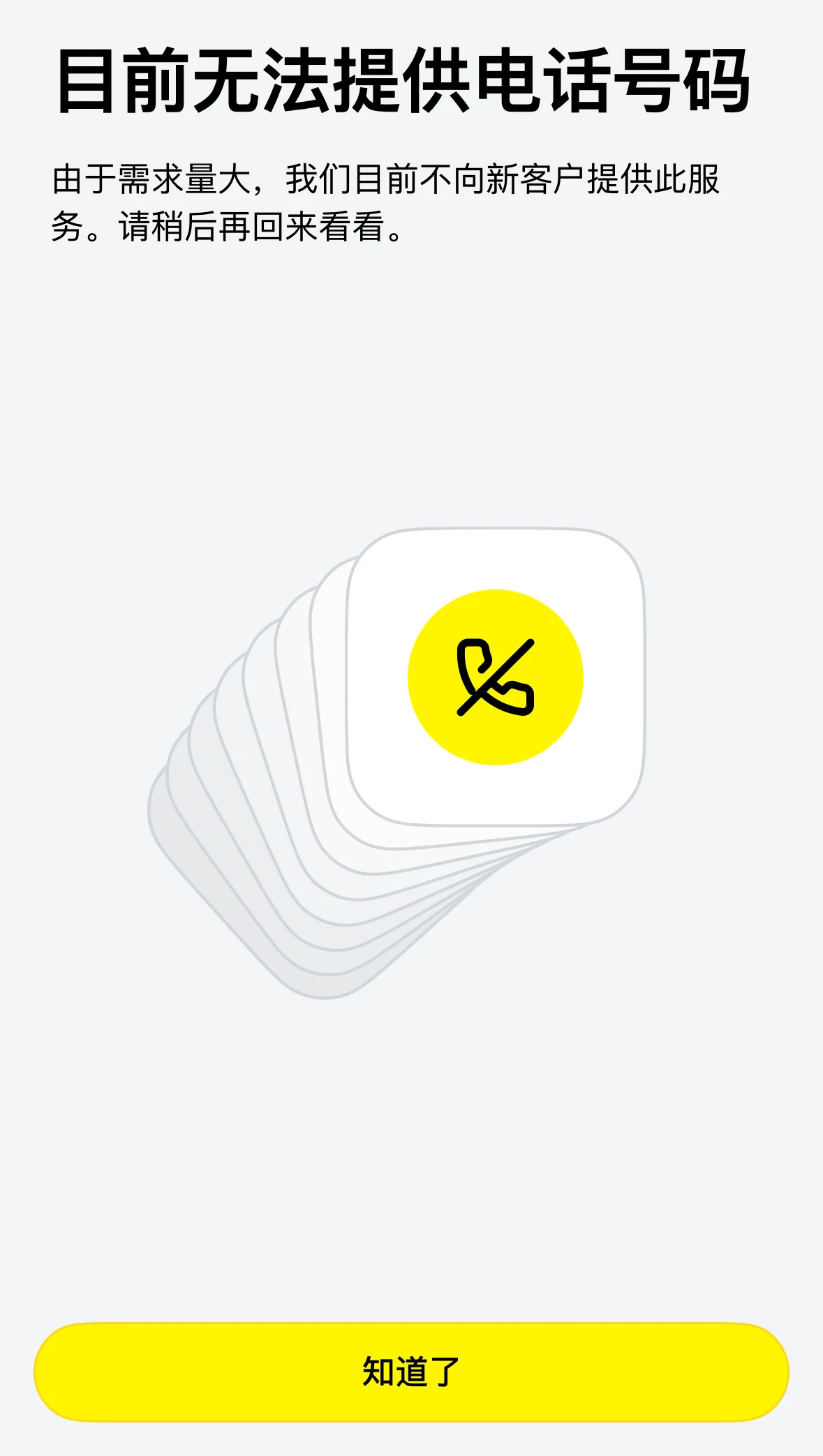
Don’t assume the feature is gone. Buying through the Saily web checkout still works—and it’s actually the smoother path right now. You avoid the outdated-app bug that hides the annual plan, the coupon box sits right beside the order summary, and web checkout supports Visa, Mastercard, UnionPay, JCB, Apple Pay, PayPal, and Google Pay.
Here is the full web-checkout plus in-app KYC sequence:
- Open the phone number page on
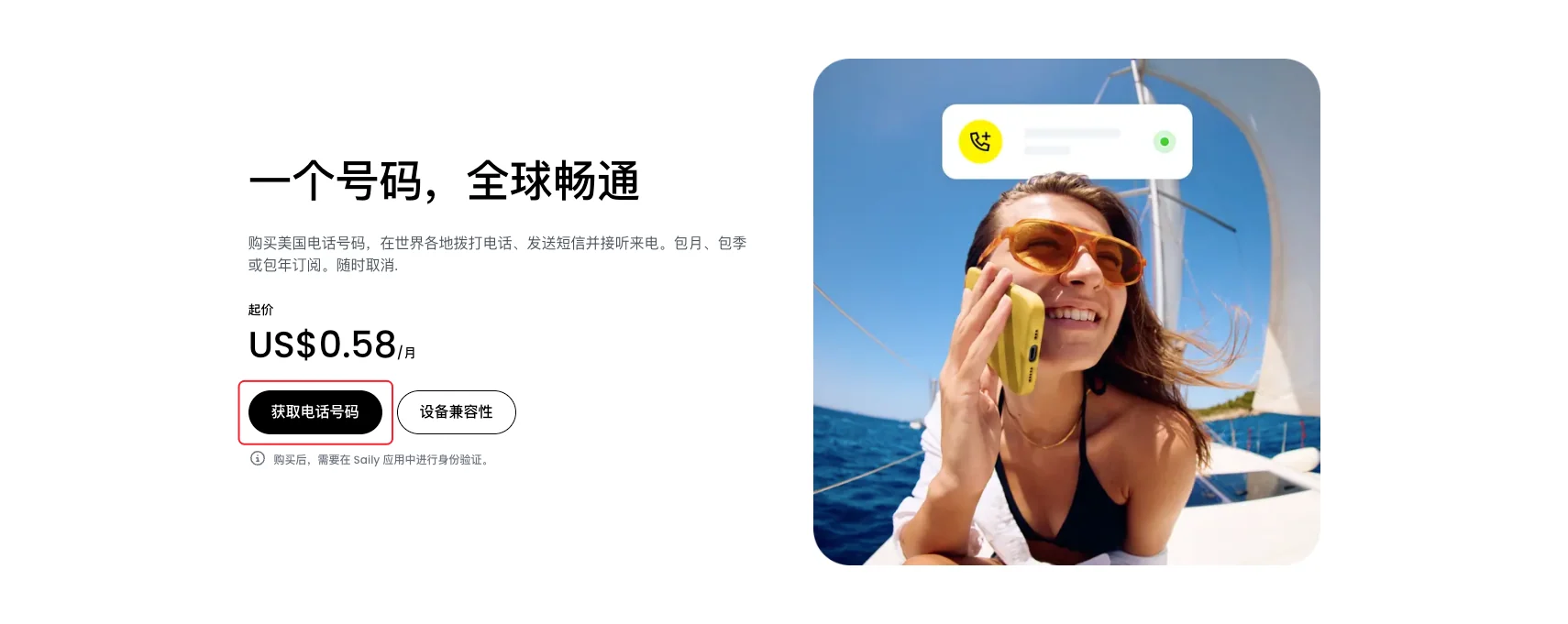
saily.com, sign in or create your Saily account (passwordless login via Apple, Google, or email), and click the button to get a phone number.
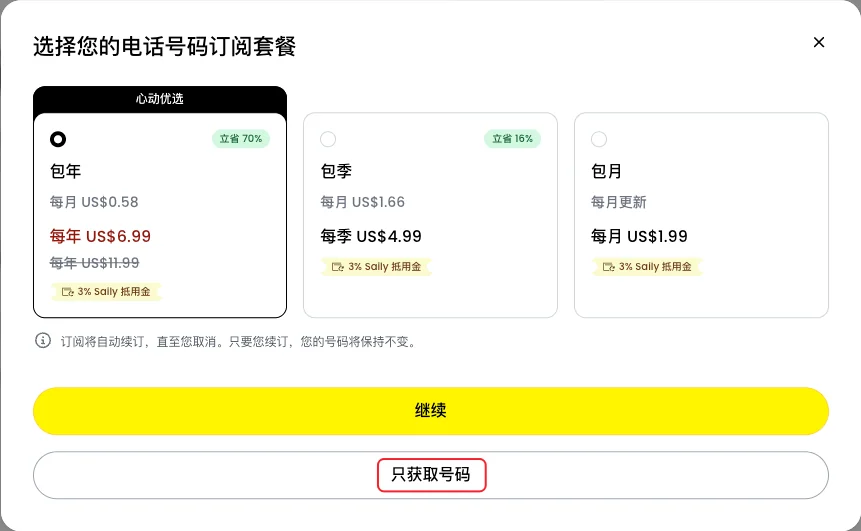
- In the subscription modal, choose the annual plan ($11.99/year list price, dropping to $6.99/year—about $0.58/month—after the $5 discount, plus 3% back in Saily credits). If you only want the number for incoming verification SMS, skip the yellow Continue button (which leads into voice/text bundles) and click the bottom number-only option instead.
- On the checkout page, pause before paying. Open the coupon box below the order summary on the right, enter
ZFAROT3665, and apply it. Verify that the summary shows the $11.99 subtotal, the -$5.00 coupon deduction, and a $6.99 total today (plus $0.21 in Saily credits), then finish payment on the left with a credit/debit card (including UnionPay), Apple Pay, PayPal, or Google Pay.
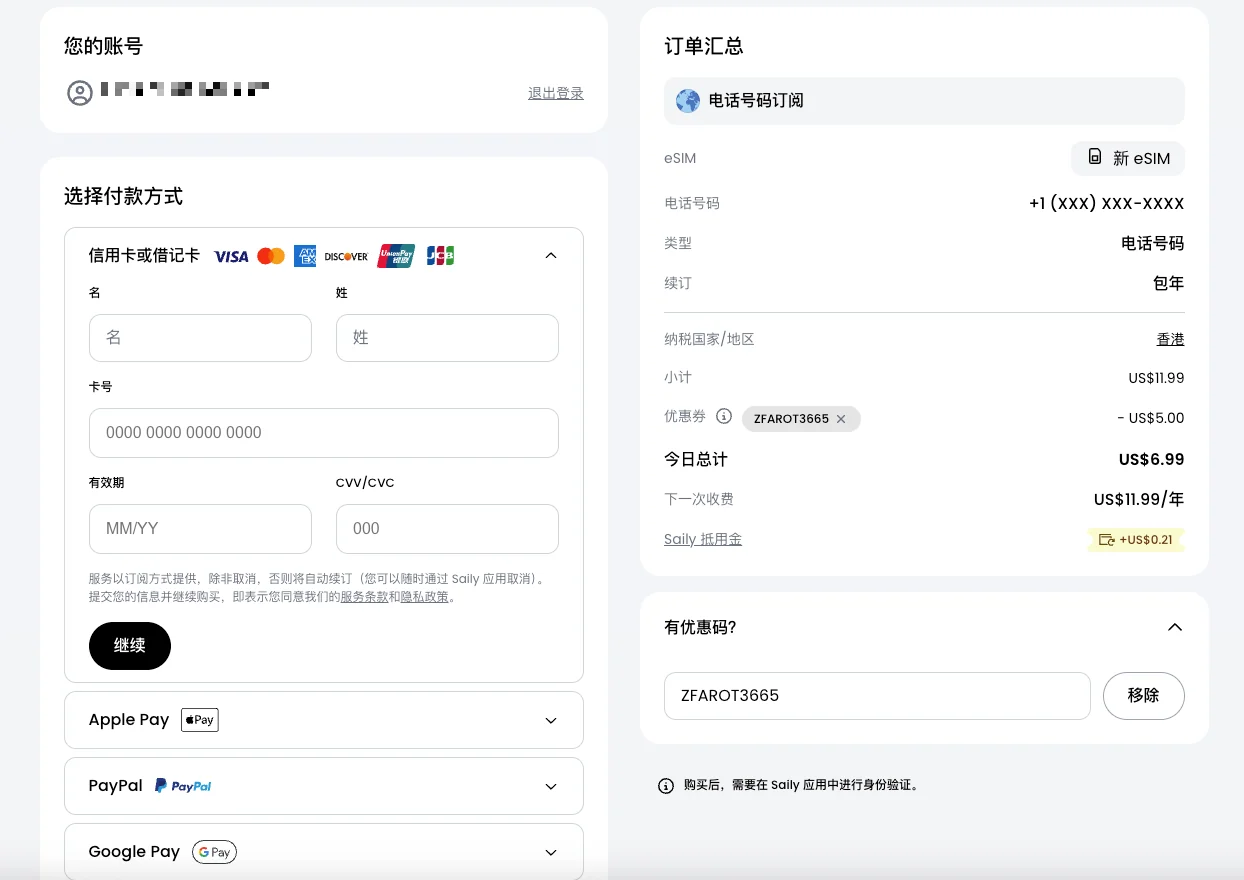
- As the note at the bottom of web checkout states, identity verification still happens inside the Saily mobile app. After payment clears, open the Saily app logged into the same account and finish the third-party KYC prompt (document photo plus selfie). Saily’s data-only travel eSIMs usually don’t require ID verification, but the US phone number strictly mandates KYC. Mainland China users can verify with a national ID card, passport, or driver’s license, and Saily only assigns and reveals your number after approval.
You cannot pick your own area code; assignment is random like a lucky draw. I ended up with a 940 prefix. My immediate reason for buying it was registering a Charles Schwab Developer Portal account—2026 signups require a +1 US phone number—and the verification SMS arrived inside the Saily app on the first try. Subsequent login codes have arrived reliably too.
Before treating it as an everyday backup US line, it helps to know the official limits. According to Saily’s help center, the number receives plain-text SMS directly while your subscription stays active, and you can buy a voice/SMS pack on demand if you ever need to send texts or make local US calls. It does not support MMS (so images and group texts won’t go through), outbound international calling, or call forwarding.
Under the hood, Saily’s phone number runs on VoIP technology. Mainstream overseas platforms and apps generally deliver codes without trouble, but US retail banks with strict anti-VoIP filters may still reject it. If your main goal is tying a number to core US banking accounts, Ultra Mobile PayGo is safer; for low-cost OTP reception and a backup line, Saily is much better value.
The $4 Mistake: An Earlier In-App Update Trap
If you still prefer buying inside the mobile app, here is the mistake I made earlier so you don’t repeat it.
Right after installing Saily fresh from the iOS App Store, I opened the phone number purchase screen and saw no annual option at all—only $1.99 a month. Assuming monthly was the only choice, and without checking whether the $5 discount was strictly first-order only, I paid $1.99 to get started.
Minutes later, I saw other people mentioning an $11.99 annual plan that took $5 right off the top. I went back to the App Store to check, and absurdly enough, the app I had literally just downloaded wasn’t the latest build. Only after tapping Update manually did the $11.99/year option appear.
That was the trap. The $1.99 monthly order had already burned my first-order discount eligibility, so switching to the annual plan refused to take the $5 referral code. I reached out to in-app live support; after a bit of back-and-forth, they gave me a $1 credit and refunded the $1.99 monthly payment in full.
At first I miscalculated and thought the monthly payment was gone too. Once the refund landed, the real math was clear: I ended up paying $10.99 net for the year—$4 more than the $6.99 I would have paid by ordering the annual plan first. Four dollars isn’t life-changing money, sure, but the whole point was keeping costs down. Going through web checkout for the annual number-only plan now sidesteps both the in-app unavailability prompt and this version trap.
Comments
Spot a flaw, hit the same snag, or just want to say hi — leave a note below.
Loading comments…